
Ivano's Italiano, the Italian takeaway at 11 Whitesands in Dumfries, takes orders online at its own website, ivanos.uk, for delivery or collection. You pay by card, Apple Pay or Google Pay, follow your order on its own page, and can save your details for next time if you like. Until we reopen, the site shows the menu but isn't taking orders.
In this article9 sections
Ordering direct means your order comes straight into our kitchen on the Whitesands, with no app in between. This guide walks through it, step by step.
At a glance
Where
ivanos.uk, on your phone or computer
How you pay
Card, Apple Pay, Google Pay or Link. There's no cash option online
Your order
Its own page to follow, and an email at each step
Next time
Save your details, or carry on as a guest
When
Thursday to Sunday, 4pm to 10pm, once we reopen
Choose your food
Open ivanos.uk and tap a dish to add it to your basket. Some dishes ask you to choose before they go in:
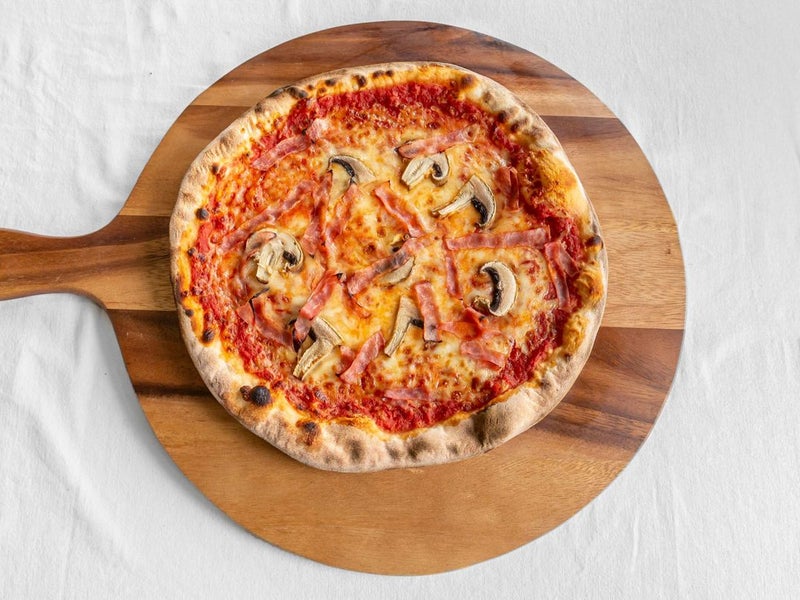
- Pizzas: the size (10-inch or 12-inch, where both are offered) and your cheese: mozzarella, vegan mozzarella or no cheese.
- Pasta: penne, spaghetti or tagliatelle. The dishes made with gluten-free penne have their own section.
- Extras: toppings, add-ons and dips, if you'd like any.
Your basket keeps a running total. If you have a discount code, type it into the box in the basket and press Apply. The full menu is on this site too, if you'd like a look first.
Allergies: tell us before you order
Please check our allergen information first. If anyone you're ordering for has a food allergy, add it in the notes box at the checkout, or ring the shop before you place your order (the number is on our contact page), so we know before we start cooking.
Delivery or collection
At the checkout, choose Delivery or Collection.
- Delivery: put in your address and postcode. The checkout works out how far you are from the shop and shows the delivery charge before you pay. We deliver with our own drivers up to about four miles from the Whitesands: see where we deliver in Dumfries. If you're outside the area, the checkout tells you, and you can switch to collection.
- Collection: there's no delivery charge, and you pick your food up from the counter at 11 Whitesands. There's more in collecting your order.
Your details
We ask for three things:
- Your name.
- Your mobile number, so our driver can ring you if they can't find the house. Please double-check it: if the driver can't find you or reach you, the food comes back to the shop, and our terms explain what happens then.
- Your email address, for your receipt and to tell you when your order is confirmed.
There's also an optional Notes for the kitchen box. Use it for an allergy, or a request such as no chilli or no cheese, and it's printed on your order in the kitchen. And there's a tick box for offers and discount codes by email. It's optional and starts unticked, and the emails about your order never carry offers.
Paying: card, Apple Pay or Google Pay
Online orders are paid by card. You can pay with:
Debit or credit card
Entered at the checkout
Apple Pay
On an iPhone, iPad or Mac that has it set up
Google Pay
On an Android phone, or in Chrome, where it's set up
Link
Stripe's own way of saving your details for next time
Payments are handled by Stripe. We never see or store your card number.
Paid now, charged when we accept
When you pay, we put a hold on your card for the amount, and you're only charged once we accept the order. If we can't accept it, the hold is released and you aren't charged, though your bank may take a few days to remove it from your statement.
Following your order
After paying, you land on your order's own page, and the same link is in your email. It shows where things stand:
Waiting for the shop
We've got your order and it's waiting for our confirmation; the hold is on your card.
Your order's being prepared
We've accepted it and taken the payment. Underneath, you'll see the estimated delivery time, or the time it will be ready to collect.
Your emails follow the same steps. If we accept the order straight away, you get one email, Order confirmed. If it waits for us, you get We've got your order first, then the confirmation. If we can't take an order, the email says so and tells you that you haven't been charged.
On busy nights the estimate is longer, and we'd rather tell you that honestly than promise a time we can't keep. The page doesn't yet show when the driver has left the shop.
Save your details, if you like
You never need an account to order. Guest checkout is always there. If you'd like to save typing next time, there are three ways:
- After you've paid as a guest, your order page offers Save your details: type the email address you used for the order and choose a password, or press Continue with Google.
- Your confirmation email has a link to do the same.
- Or sign up at ivanos.uk with an email and password, or with Google.
With an account, the checkout fills in your details for you, and your account page shows your past orders, with your last three one tap away under Order again. You can change your details, switch offer emails on or off, or delete your account there. Your account doesn't store your card: you pay each time, which is quick with Apple Pay or Google Pay.
Put Ivano's on your home screen
You can keep ivanos.uk on your phone like an app, with its own Ivano's icon, without downloading anything:
- iPhone: open ivanos.uk in Safari, tap Share, then Add to Home Screen.
- Android: open it in Chrome, tap the menu (the three dots), then Install app or Add to Home screen.
It opens full screen, without the browser bar. It's still our website underneath, so it always shows today's menu and prices.
When we're open
Once we reopen, we're open Thursday to Sunday, 4pm to 10pm, for delivery across most of Dumfries and collection from 11 Whitesands, DG1 2RR. If you'd rather use a delivery app, our article on Just Eat, Uber Eats, Deliveroo and Foodhub explains where you'll find us and why ordering direct helps us most.
Ordering questions
Can I order from Ivano's online now?
Not yet. Until we reopen, ivanos.uk shows the menu but isn't taking orders. Once we reopen, we're open Thursday to Sunday, 4pm to 10pm.
Can I pay cash for an online order?
No. Online orders are paid by card, Apple Pay, Google Pay or Link, through Stripe. We never see or store your card number.
When is my card charged?
When we accept your order. Until then there's a hold on your card for the amount. If we can't accept the order, the hold is released and you aren't charged.
Do I need an account to order?
No. Guest checkout is always there. If you want to save your details, you can do it after you've paid, from your order page or your confirmation email, or with Continue with Google.
How do I tell you about an allergy when I order online?
Add it in the notes box at the checkout ("Notes for the kitchen"), or ring the shop before you place the order, so we know before we start cooking. The number is on our contact page, and the allergens for our dishes are on our allergens page.
Have an allergy? Please read our allergen information and tell us before you order.
Order online
Pizza, pasta and fish and chips for delivery or collection in Dumfries.
- Our own drivers
- Collect from 11 Whitesands
- Card, Apple Pay, Google Pay
Reopening soon · Thursday to Sunday, 4pm – 10pm
Or call 07777 148453